BIDSIMP FOR EDUCATORS Free Teacher Portal
Turn hands-on practice
into classroom progress.
Give your class a clear next step. Bring construction games and trainers into your private school or independent training program, with saved participation in one place.
For private programs and independent instruction with students 13 and older. Get Started Free checks availability and takes you to classroom setup.
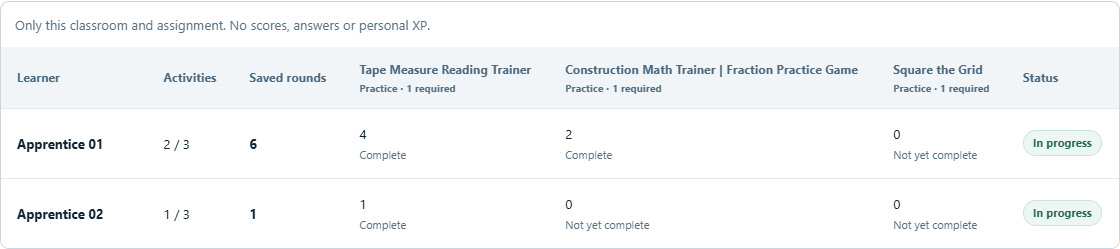
One BidSimp account. Clear assignments. Automatic participation tracking.
HOW IT WORKS
From an assignment to a saved round.
A simple routine for you and your students.
Create your classroom
Complete the brief Start Teaching setup, name your classroom, and share its invitation code with your students.
Choose the practice
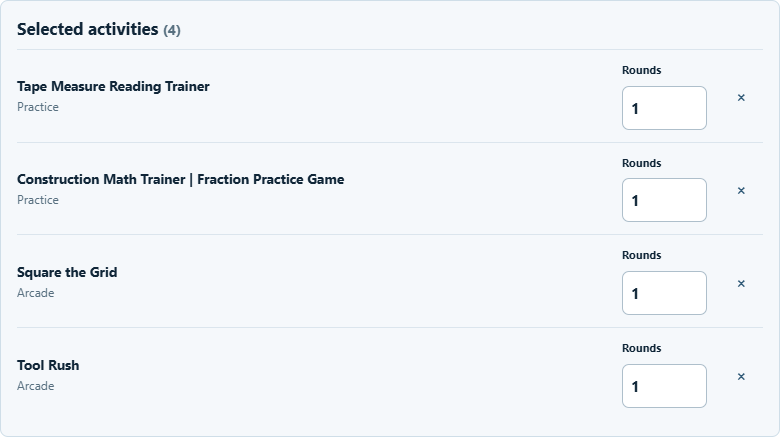
Select supported games and trainers, add instructions, choose required rounds, and publish the assignment.
Students join and play
Students request to join with the code. After your membership approval, they open the assignment and launch each activity.
See progress save
Confirmed completed rounds appear in Class Progress. Replays add to the count, so continued practice is visible.
FAMILIAR ACTIVITIES. A SHARED PURPOSE.
Your next lesson,
ready for practice.
Build an assignment from the activities students already enjoy in BidSimp. Keep it focused on one skill or bring a few skills together.
Choose from the activity catalog
Find measurement, construction math, layout, tool recognition and more. Only activities with supported completion tracking are available to assign.
Set a clear finish line
Add plain-language instructions, an optional due date, and the number of completed rounds you want for each activity.
Keep your class organized
Save a draft, publish when you're ready, and share announcements in your classroom feed.
PRACTICE THAT CARRIES FORWARD
They play.
You see the progress.
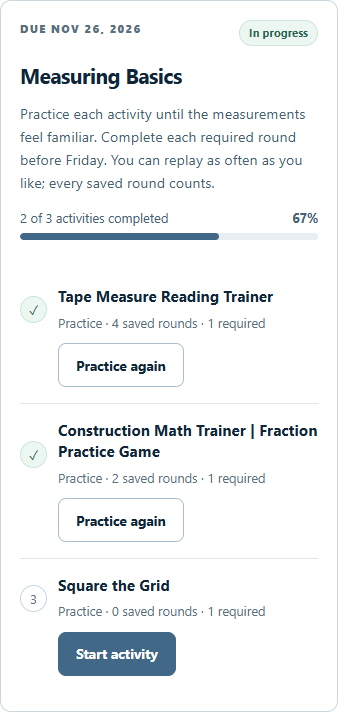
Students open My Classrooms, find their assignment, and jump into an activity. The familiar gameplay stays the same.
Every saved round has a place
Classroom progress updates after BidSimp confirms a completed round. Students don't need to upload screenshots or submit certificates.
Replays count, too
See completed requirements and the number of saved rounds for each assigned activity. Practicing again can add a round even when it earns no extra XP.
A clear view of what's saved
Confirmed progress is there when students return. Saving and pending-sync messages identify rounds that haven't been confirmed yet.
A FOCUSED VIEW OF PARTICIPATION
The classroom picture.
Without the personal history.
Your report shows the practice assigned in your classroom. Joining a class doesn't open a student's complete BidSimp account to an instructor.
Instructors can see
- The student's classroom name or alias
- Assigned activity completion status
- Saved round counts for each activity
Kept out of instructor reports
- Individual scores and answers
- Personal XP and unrelated learning history
- Workspace projects and account contact details
A FEW THINGS TO KNOW
Questions, answered.
Do teachers and students need separate accounts?
No. Everyone uses their existing BidSimp account. Instructors choose Start Teaching and complete a brief setup; teaching access activates automatically when the service is available. Students join from the Learning Hub using the existing protected 13+ account eligibility. They choose to join and read the sharing notice, then their instructor approves membership.
Personal My Learning is optional. Assigned rounds can save minimal classroom participation without personal performance history or XP. If a student chooses My Learning, its separate records and XP continue normally; a public rank badge they choose to enable may reflect that XP. No permanent teacher or student role is required at registration.
How does a classroom code work?
A teacher shares a classroom invitation code with their intended students. Entering it sends a membership request; the instructor must approve the student before assignments become available. A code alone does not provide access to the roster or other students' records.
Does activity progress save automatically?
Yes, for supported activities launched from an approved classroom assignment. A completed round counts once BidSimp confirms it is saved. Replaying creates a new round; refreshing or retrying a save does not double-count it.
A pending-sync message means the round is not confirmed yet. Keep the same account signed in on that device and retry when connected. Confirmed progress is available on other devices; an unsynced round remains on the original device and can be lost on sign-out or account switching. Earlier play outside an assignment is not imported.
Is Class Progress a gradebook?
No. It tracks participation: which assigned activities students completed and how many valid rounds they saved. Teachers do not receive scores, answers or personal XP. Games and trainers use browser-reported practice evidence, while supported quizzes retain their existing answer checks. These activities are not proctored examinations or professional certifications.
Who can use Teacher Portal?
Private trade schools, independent vocational programs, private secondary programs and independent construction instructors can use the standard service for students 13 and older when they have the necessary authority and permissions. Start Teaching is self-service; no email or manual account approval is required. A program name is self-declared and never gives access to another instructor's classrooms.
Review the Teacher Portal terms and data practices for the retention policy and uses requiring arrangements the standard service does not provide. BidSimp is not universally approved or certified for every school. Under-13 accounts cannot enroll. Parents and eligible students should use their program's verified records process; support is available for exceptional requests.
FREE TEACHER PORTAL
Give practice a place
in your classroom.
Use your BidSimp account, complete a brief setup, and create a classroom for your students.