Free Projects to organize the job. Pro to run and understand it.
THE JOB, IN FOCUS
One place to see the plan and the field.
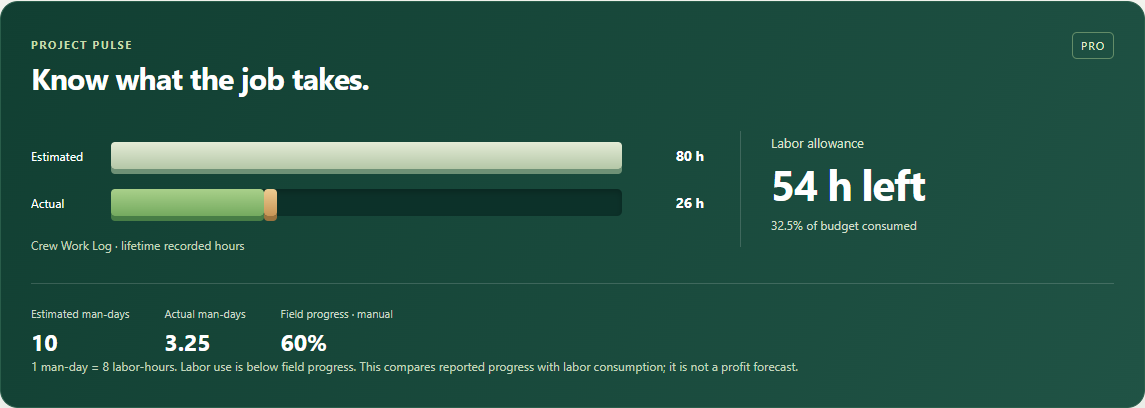
Project Pulse brings your labor allowance and recorded Work Log hours into one clear view. Know what you planned, what you have used, and what remains.
Actual Project Hub interface. Synthetic example data.
ESTIMATED VS ACTUAL · PRO
The hours tell a useful story.
Set a labor allowance in hours or man-days. Or import the explicit workers × days × hours from a saved Price Build-Up, with a review before anything changes.
Connect a Work Log job to compare lifetime recorded hours against that allowance. Regular time and overtime stay distinct, and an overrun shows its exact hours.
Optional field progress is your own estimate of completion. The pace comparison helps you ask better questions; it does not predict profit or a completion date.
A CONNECTED WORKFLOW
The bid stays with the job.
Focused project tabs keep each part of the work easy to find.
01 / PROPOSALS · PRO
From accepted proposal to active project.
Create a project from a saved accepted proposal, then confirm the details. Or link an existing proposal. Open the original agreement whenever you need its scope, amount or status.
Link an owned Work Log job or deliberately create one. See lifetime totals and the last 90 days of detail by week, worker, location and configured pay period. Your Work Log remains the place to record and edit time.
Keep planned calculators, saved takeoffs and Price Build-Up records together. Consolidate material lines by trade, review quantities, and export the supplier material PDF.
For estimators, working foremen and small contractors who want the estimate and field work in the same conversation.
Projects membership capabilities
Capability
Free
Pro
Projects, status & archive
Included
Included
Takeoffs, pricing & supplier materials
Included
Included
Notes & pinned reminders
Included
Included
Proposal & Work Log connections
—
Included
Project Pulse & labor comparison
—
Included
Crew labor breakdowns
—
Included
A FEW PRACTICAL ANSWERS
Before the next job.
Can I use Projects without an account?
Yes. Free Projects can be saved locally in your browser. Sign in to use the existing account cloud sync across devices. Connected Pro features require sign-in and an active membership.
Does Project Hub create a second time sheet?
No. Work Log remains the source of time entries. Project Hub reads the selected job’s totals and reporting details.
How are man-days calculated?
Labor-hours divided by your chosen hours per man-day, defaulting to eight. Two people working eight hours each use sixteen labor-hours, or two eight-hour man-days.
What happens if Pro ends?
Your projects, estimates, notes, saved links, budgets and history remain. Free organization stays usable. New connections and advanced labor analysis require an active Pro membership.
Is this payroll, accounting or scheduling software?
No. V1 connects your existing estimating, proposals and Work Log. It does not calculate profit, process payroll or schedule a crew.